 Rolf Mistelbacher
Detailed Task Cards
Task cards can stay compact, or show label and project names in full. The filter bar is also tighter, and the workspace name now sits next to your avatar.
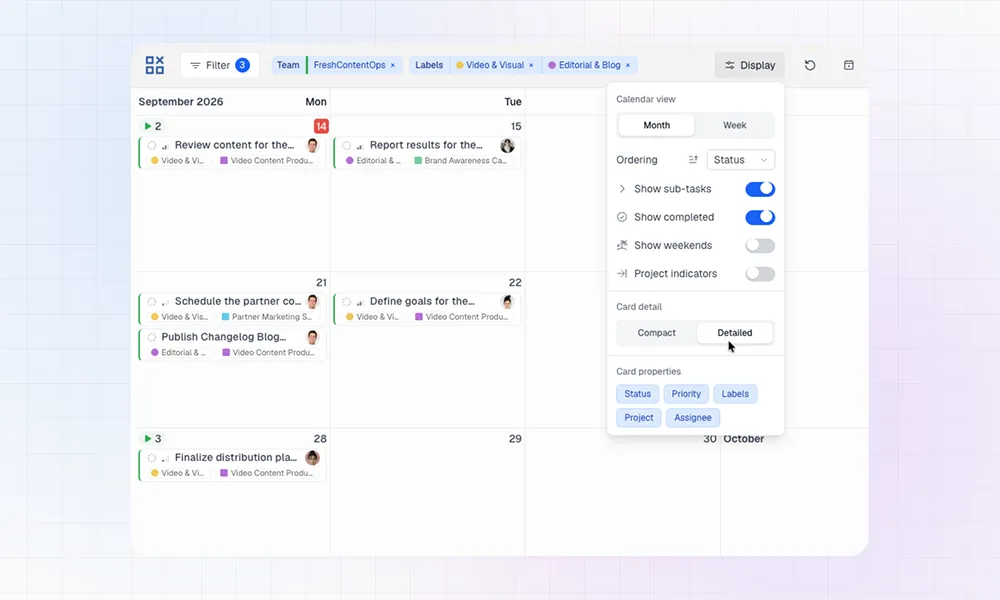
New Display Option: Card detail
Linear lets you give labels and projects a color. In LinCal those colors showed up on task cards as small circles and squares. That keeps the calendar dense, but it takes a moment to tell what the work actually is, and which project it belongs to.
There is a new option under Display → Card detail.
Compact is still the default: one row, colors only.
Detailed makes month-view cards taller. Labels and projects move to a second row and are written out when space allows. The title stays on the first row, so more of it is visible. If a card has no labels, project, or overdue chip, the title can wrap to two lines.
This control is for the month view. In the week view, tasks grow with the content.

Week view in LinCal
A tighter top bar
The top bar now focuses on the main actions. Sync, Today, and Share are icon-only. Hover for the label.
The active workspace name is shown next to your avatar, so you can see which Linear workspace you are in without opening the account menu.