

With the first update of LinCal in 2026, we shipped several improvements creating a better user experience.
Edit task status
Until now you had to click a task and change its status in Linear app. That destroyed the flow of quickly organizing your work on a calendar.
Now you can click the circle on a task card to update the task state in LinCal directly.
Edit task properties
With a right click on a task card, you can now edit the assignee, project, label, and cycle.
Spot overdue tasks
Task cards now have a red icon showing its overdue.
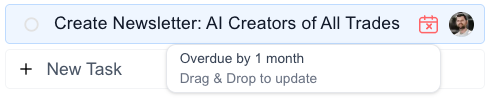
To quickly reschedule a task, drag & drop it onto the calendar grid, or move it to the tasks without due date panel to remove the due date completely.
More Refinements
Visual improvements
- Today’s date now pops with a colored background
- Month labels are clearer and easier to scan
- More space for your calendar, less clutter in the header
Performance upgrades
- Safari users: the calendar is now much more stable
- Overall smoother experience across all browsers
Small UX tweaks
- Settings and help moved under your avatar for a cleaner look
Feature requests, feedback? Shoot us an email or jump to the Google form.