Changelog
New features and improvements in LinCal.
LATESTChangelog
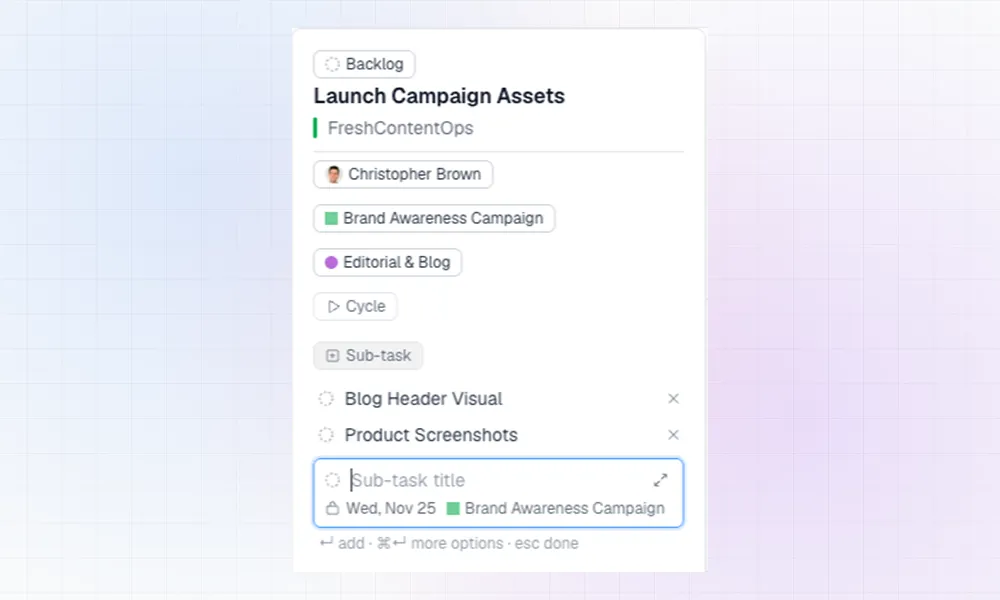
Create and Edit Sub-tasksCreate sub-tasks right on the calendar, together with a new task or on an existing one, and find them in every task's popover
 Rolf Mistelbacher
September 2026
Blocked and Blocking TasksTask cards now show when a task is blocked, or is blocking other work, and a task's status can be edited while creating.Detailed Task CardsTask cards can stay compact, or show label and project names in full. The filter bar is also tighter, and the workspace name now sits next to your avatar.Switch Between Linear WorkspacesSometimes a project outgrows the Linear workspace it started in and gets its own workspace. You can already switch between those workspaces in Linear. From today, LinCal can too.
July 2026
See the Bigger Picture: Project Dates, Task Sorting, and More Calendar ContextSee when projects start and end, spot work outside a project timeline, customize task ordering, show priorities on task cards, and create today’s task with one key.Better Task Editing + A Smarter No-Due-Date BarLinCal now makes task planning faster with quicker task creation, editable task titles, copyable task links, and a revamped no-due-date bar with search.
June 2026
May 2026
March 2026
February 2026
Improvements: Filtering and Display OptionsFiltering in LinCal just got a lot more powerful — and a lot less disruptive. This update adds keyboard-first filtering, smarter behavior when switching teams, and more control over what you see on your task cards.Share Calendars, Visual Filtering, and PolishShareable calendar view for Linear.app, and visual filtering, now in LinCal - the calendar app for LinearCycle Indicators, In-App Feedback, Welcome Tour, & Dark ModeWith this update, we're making LinCal more powerful for teams using cycles and easier to use from day one.
January 2026
November 2025
October 2025
September 2025
July 2025
Enhanced Settings PersistenceLinCal now remembers all your preferences perfectly across sessions:Login with Linear Account instead of personal API keyNew default login method: Log in with your Linear account, instead of API key.Improved User ExperienceImproved User ExperienceFixed Sync Button IssueThe sync button now works instantly! Previously, after clicking sync to get the latest updates from Linear, you had to manually navigate (click the arrow buttons) to see the changes in your calendar.Updated HomepageTo better explain the current feature set of LinCal.