
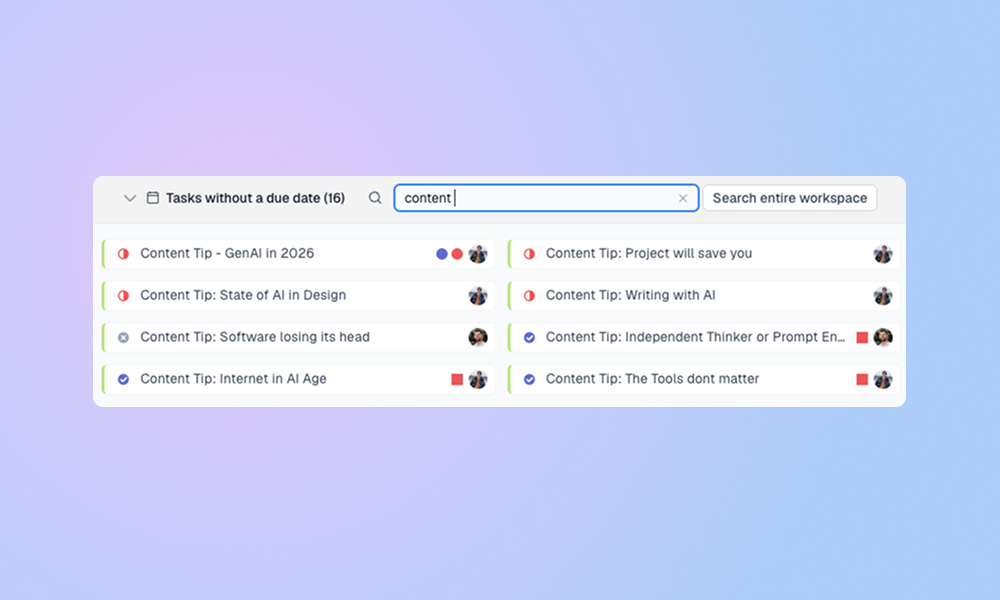
LinCal now makes task planning faster with quicker task creation, editable task titles, copyable task links, and a revamped no-due-date bar with search.
Faster task creation and editing
You can now create tasks faster by typing the task title directly into a calendar day. Press Enter, choose the team and properties, and create the task without leaving the calendar context.
💡 If only one team is active in your current calendar filters, LinCal automatically uses that team for the new task, so you can skip the team selection step.
Task editing is also smoother:
- Edit task titles directly from the task edit panel.
- Copy the Linear task URL from the task identifier.
💡 LinCal also remembers recently used property combinations and suggests them as quick adds. This makes repeated task creation faster when you often use the same assignee, project, label, or cycle setup.
Revamped no-due-date bar
The tasks without due date bar now includes search and better handling for large workspaces.
It shows no-due-date tasks that match your current calendar filters, including teams, views, assignees, projects, labels, statuses, cycles, completed tasks, and sub-issues.
By default, LinCal loads up to 100 recently updated matching tasks to keep the calendar fast. Use filters or display settings to narrow the list further, including whether completed tasks and sub-issues are shown.
Typing in the search field filters the loaded tasks by title and task identifier. If the task is not loaded, use Search entire workspace to search Linear by title using the same active filters. Workspace search is also capped at 100 results.
💡You can drag tasks from the bar onto the calendar to schedule them, or drag dated tasks back into the bar to remove the due date.
Fixed: Workspace views now load more reliably
Shared workspace views now include tasks from accessible Linear teams, even if you are not a member of those teams in LinCal. This fixes cases where a view appeared empty because it included tasks from another team.
Feature requests, feedback? Shoot us an email or use the in-app feedback button in the bottom right corner!