Rolf Mistelbacher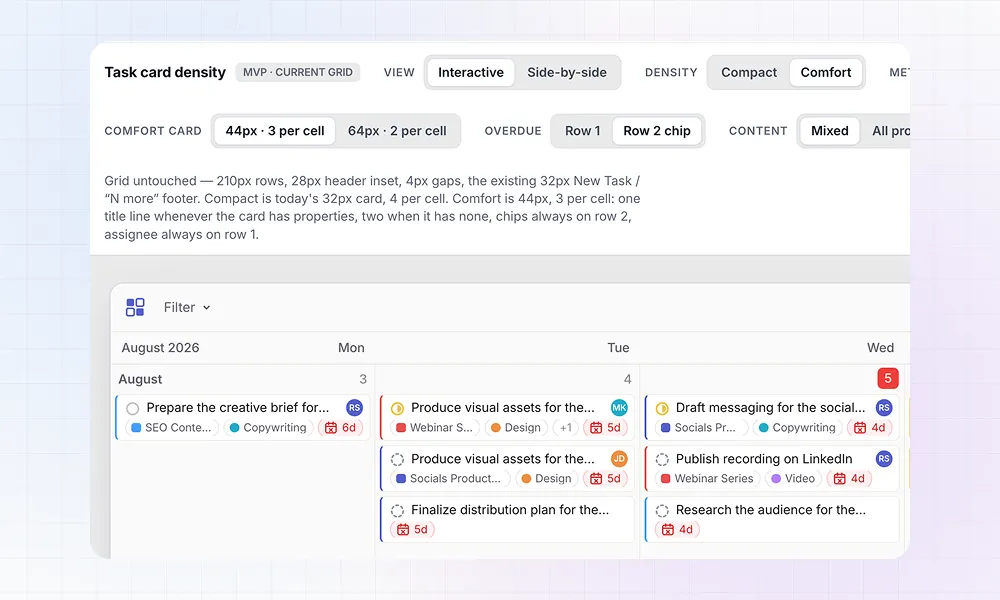
Claude Design left the hype cycle. It never left my workflow.
I used it to explore a feature request we get often for LinCal: a way to see more details on a task card. A “comfort” option where the card is bigger and shows more information without having to open it.
On the surface, this is super easy. Just double the task card size and show more. But then the little details emerge that need answers.
Should all task properties go into the second row on the task card, or should the overdue icon and assignee stay on row 1? What if there are no properties on the task; should the task title extend to row 2? Should we mix title and task properties across two rows if spacing permits it?
I could explore all of that in code directly, but Claude Design is so much better for iterating this process. One main advantage is the UI it creates around a design to compare different versions of created designs.
Here is a short video showing how I kept iterating on this seemingly simple design task.
It’s now live in LinCal. Try it out: Display → Card detail, so cards can stay compact or show label and project names in full.